
If you are building a new website, redesigning an existing one, adding services, or trying to make sense of years of website updates, keyword mapping can save you from making a whole lot of decisions from memory.
Instead of trying to remember which keyword belonged to which page, whether you have already targeted a keyword somewhere else, or why two pages were starting to sound suspiciously similar. Start with a keyword map so you can see the whole strategy in one place. Let me show you how to create your own keyword map!
What Is Keyword Mapping?
Keyword mapping is the process of assigning keywords and search topics to specific pages on your website.
Instead of collecting a list of keywords and then trying to work all of them into whichever page you happen to be writing, you decide ahead of time where each search belongs.
Keyword mapping also helps you make sure the purpose of each page is actually different enough to justify having separate pages.
For example, a photographer might have a website structured around searches like:
- Home → Michigan wedding photographer
- Elopements → Michigan elopement photographer
- Detroit → Detroit wedding photographer
- Traverse City → Traverse City wedding photographer
Each page has its own primary focus while still fitting into the larger website strategy.
Once you begin assigning those keywords to specific website pages and URLs, you are also creating a keyword URL mapping for your site.
The terminology sounds technical, but the question you’re really answering is pretty simple: Which page should Google show for this search?
If you don’t know the answer, there’s a decent chance Google won’t either.
6 Categories to Include in Your Keyword Mapping Table
The version we use at Kinfolk Creative is intentionally simple.
For each page, we track:
- Page
- Primary keyword
- Search data
- Secondary keywords
- Page title
- Meta description
You can build this in Google Sheets, Notion, Airtable, or whatever system you know you will actually revisit later.
1. Page
Start by listing the important pages that already exist on your website. For a smaller service-based website, that might begin with Home, About, Services, and Contact before branching into your individual services and locations.
If you are keyword mapping an existing website, I would do this before changing anything.
Simply getting all of your pages in front of you can expose things that are difficult to notice when you are clicking through your site one page at a time.
You may realize you have an old service page you forgot about, multiple pages covering almost the same topic, or an important service that barely has a presence on the website at all.
I always recommend to map first, fix second.
2. Primary Keyword
Next, decide on the primary keyword or search topic that best matches the purpose of each page.
You want to consider what your audience is searching, what Google is currently showing for that search, and whether your page would genuinely satisfy the intent behind it.
The keyword should support the page you already need. Seeing every primary keyword in one column also makes overlap easier to catch.
If your homepage, main service page, portfolio, and two location pages are all unintentionally targeting the exact same keyword, you’ll want to update that by picking which page that keyword belongs to.
I also want to make a note that this doesn’t automatically mean the primary keyword can never appear on more than one page. It just means that you need to be clear about which page is supposed to be the strongest answer for that particular search.
3. Search Data
Search data is helpful, but I consider this column optional. If you have access to search volume, keyword difficulty, current ranking position, or other useful information, include it, but seriously, it’s not that serious if you’re DIY-ing.
Search data can help you compare opportunities and make more informed decisions about which keyword belongs on which page.
I would not let a lack of expensive SEO software stop you from building the table. Plus, you’ll get the data for free when your website is set-up to Google Search Console and Google Analytics.
4. Secondary Keywords
Secondary keywords are the keywords that help you expand the topic of the page.
If your primary keyword is website copywriter, for example, related searches might include phrases like:
- website copywriting services
- website copywriting
- small business website copywriter
- website copywriting packages
Those related searches can help you understand the broader conversation surrounding your primary keyword and identify sections, questions, or supporting information worth including on the page.
5. Page Title
Your page title gives you another opportunity to make the purpose of the page clear. I like planning titles inside the keyword map because you can compare them across the entire website at once.
That can quickly reveal titles that are too repetitive or pages that aren’t differentiated enough from one another.
If every page on a photography website is titled some variation of: ‘Michigan Photographer – Business Name’, there is probably room to make those titles more descriptive.
Basically, your page title should help someone understand what they are clicking before they ever reach the page.
6. Meta Description
The final piece of our SEO mapping table is the meta description. I think of this as a short summary of what someone should expect from the page.
Google may choose to display different text from the page depending on the search, so a meta description is not something you can completely control. More about how to write a SEO optimized meta description in this post.
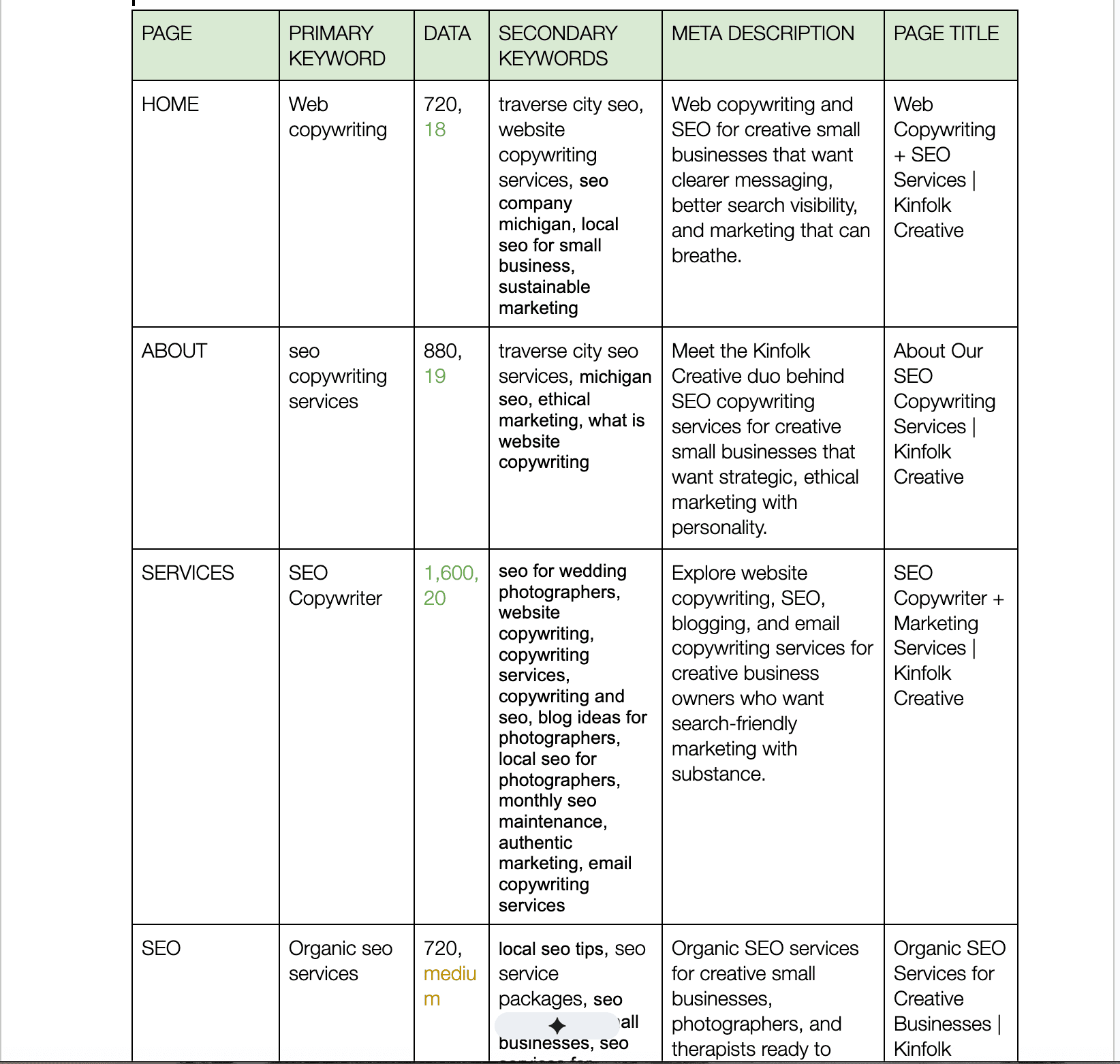
This is the keyword mapping table we use while planning and updating the Kinfolk Creative website.
Why Keyword Mapping Matters More As Your Website Grows
A four-page website is fairly easy to keep track of.
Then your business grows.
You add another service.
You create a location page.
One offer becomes three offers.
You publish more resources.
You redesign.
You retire something.
You launch something new.
Over time, those individual decisions can create a website that technically contains a lot of information but does not have much of a cohesive search strategy.
Keyword mapping gives you a way to zoom back out. Instead of looking at one page in isolation, you can see how the website works as a whole. That is when you start noticing some of the problems that are easy to miss otherwise.
Some mistakes that I find often include:
- two URLs are targeting almost identical searches
- one of your most important services does not have a dedicated page
- you find a page and cannot actually explain why it exists anymore
- built several pages around similar keywords without deciding which one should be the primary result
Your Keyword Map Can Grow With Your Website
As your website becomes more complex, you may eventually decide to add things like:
- URL — especially useful for an existing website or redesign
- Page purpose — a quick reminder of what that page is supposed to accomplish
- Search intent — whether the search is informational, commercial, local, or something else
- Current ranking — useful when you are refreshing an existing SEO strategy
- Internal links — to keep track of which important pages should connect
- Status — if the table is also part of your website workflow
Stop Building Your Website From Memory
Your website is going to change.
Your services will evolve. New keywords come up during research. Your positioning will shift. Pages get added, combined, redirected, or retired.
Keyword mapping gives you a home base for decisions. When you add a page, add it to the map. When the purpose of a page changes, update its keyword. When you discover a new opportunity, look at the existing website before deciding whether it needs another URL.
I promise your SEO strategy will get a whole lot easier to manage when it stops living entirely inside your head.
If building your keyword map makes you realize half of your website is trying to rank for the same thing or that you have no freaking clue which keyword should belong to which page, that is exactly the kind of website mess we untangle through our SEO services.
If you enjoyed this blog, check out these next!

Keyword Mapping: How To Give Every Page on Your Website a Job

We’re Kinfolk Creative—better known as the Visibility Duo.
One part strategy, one part storytelling, and a dash of “why didn’t I think of that?” We help business owners ditch the generic copy and finally show up online like they actually mean it.
If your website reads like a resume from 2014, your “About” page makes you cringe, or you’re just plain tired of yelling into the void—we’re your people.
We write words that sound like you, speak to them, and get clicks without the cringe.


